

AI is Moving from Chat to SDLC
How AI agents are turning scattered context into shared engineering memory

Hey everyone!
I’m back in your inbox and this time I want to talk about how AI Is leaving the chat window and moving Into our daily SDLC workflow.
I keep thinking about how much real company knowledge never makes it into the actual knowledge base. Company knowledge base systems usually capture only polished, official workflows, approved processes and documented features but the company’s actual knowledge lives in Slack threads, support escalations, engineering discussions, incident reviews, customer calls, tribal knowledge and in the small operational decisions teams make every day.
Not because people do not care. Most teams are just busy trying to ship the next thing. An issue arises, people jump into Slack, someone checks the logs, another engineer recalls seeing something similar before, a fix is pushed to GitHub, a few comments explain why certain decisions were made and then everyone moves on.
The issue gets fixed but knowledge ends up scattered everywhere.
Some of it stays in Slack
Some of it is buried in a pull request or 2:00 AM postmortem
Sometimes most important context exists only engineer who handled incident
Then, a few months later, when something similar happens again, another person has to piece everything together from scratch.
That is why this new wave of AI agents feels bigger than another ‘AI can write code’ moment.
For a while, AI at work meant opening a private chat window.
You asked ChatGPT, Claude, Gemini or another assistant for help. It helped you think through a problem, write a function, debug an error, or summarize something. Useful, yes but mostly private. One person got unstuck, while team’s shared memory barely changed.
Now AI is starting to move into the places where software work actually happens.
These include Slack, GitHub, tickets, docs, monitoring tools, cloud systems, runbooks, incidents, reviews and postmortems.
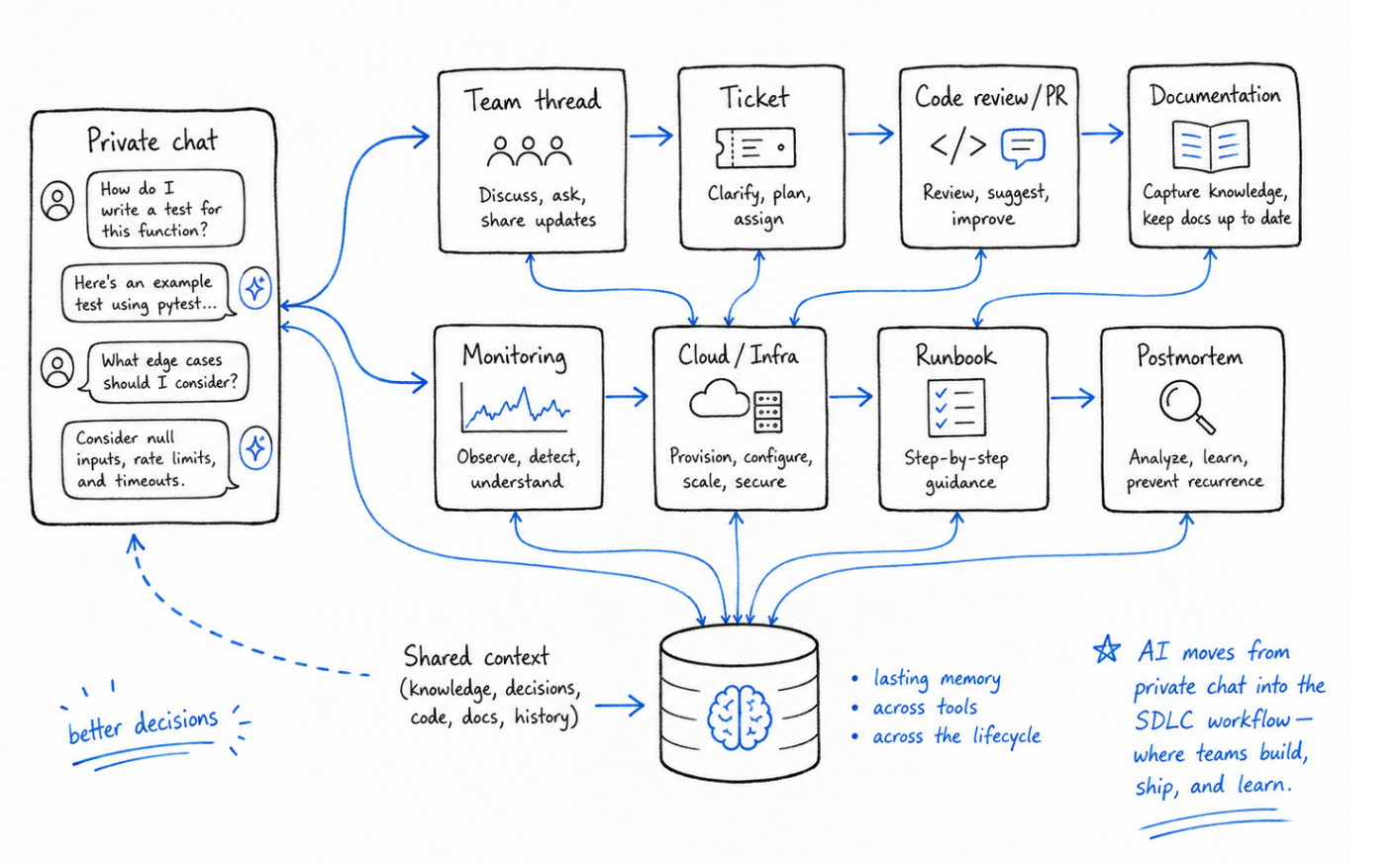
That shift matters because software development is more than just writing code.
It is also about understanding why something needs to be built, how system behaves in production, what broke last time, who made which decision, where the documentation lives and what the team has already learned the hard way.
AI is leaving chat window and moving into the SDLC and more interesting story is helping teams remember better and move faster.
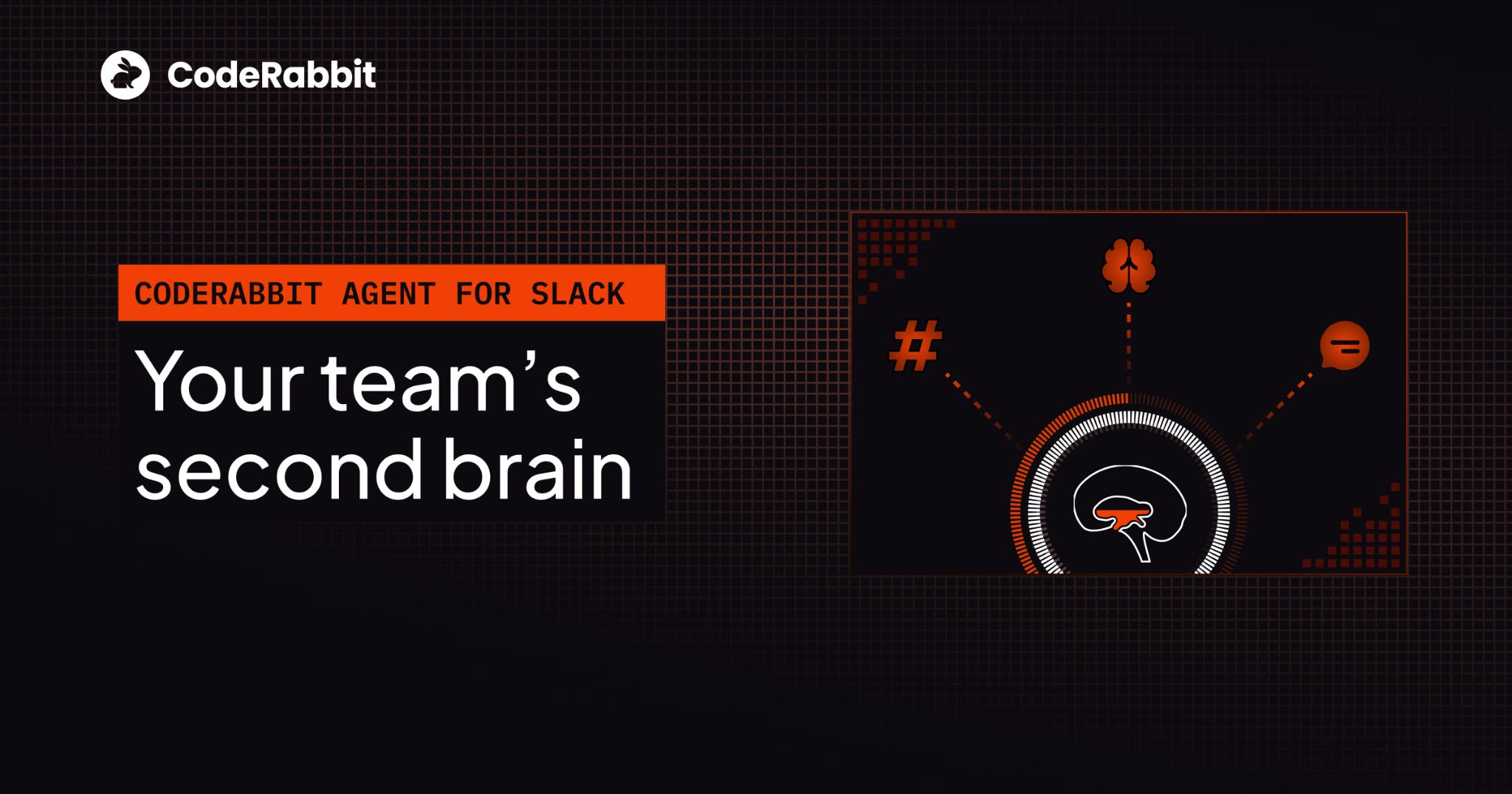
Your team’s second brain. Now in Slack.
Your engineers talk in Slack. They code in the terminal. Somewhere between those two things, context goes to die.
A bug is debated in #incidents at 2 AM.
An architectural call is made in a DM.
Every handoff leaks context and every leak costs you. That’s the context tax - and your team pays it every day.
CodeRabbit Agent for Slack is built for agentic SDLC workflows. One agent for your entire Software Development Lifecycle, living in the channel where the work already happens. It’s built on four things:
Context - your org’s operating picture, pulled from across code, tickets, docs, monitoring and cloud.
Knowledge Base - a living memory of your team. Every run leaves a trace, so yesterday’s decisions don’t become tomorrow’s debates.
Multi-Player - works in shared threads alongside your team. Steerable, resumable and aligned as work evolves.
Governance - scoped access, cost attribution. Every run is explainable and attributed.
Your team keeps shipping, while the agent keeps the context.
From the team that pioneered AI code reviews. 2M code reviews every week. 6M repos. 15K customers. And now, one agent for your entire SDLC, right in Slack.
(Thanks, CodeRabbit team for partnering on this post.)
SDLC has always been a knowledge system.
When people talk about software development lifecycle, they often make it sound very clean.
You plan work, write code, review code, test it, ship it, document it and maintain it.
But anyone who has worked inside a real engineering team knows it is never that neat.
Most features do not begin with a perfectly written ticket. They usually start in a much messier way with product explaining a user problem, engineering raising edge cases, support bringing up customer complaints and design clarifying how the experience is supposed to work.
Along the way, someone remembers an old constraint or past decision that still affects the system today. As those conversations happen, ticket changes, scope shifts and team gradually develops a better understanding of actual problem they are trying to solve.
Same thing happens during code review.
A reviewer is not only checking whether code works.
They are passing on team judgment how codebase should be structured, which patterns to avoid, which abstractions are becoming risky, which shortcuts are acceptable and which ones will create problems later. That is real knowledge.
When something breaks in production, team jumps into an incident channel to brainstorm and troubleshoot.
An engineer check logs, traces, dashboards, recent deploys, cloud configuration, feature flags and customer reports. Finally, someone pieces together what went wrong, another person ships the fix, a postmortem gets written and sometimes runbook gets updated.
SDLC is not just a process for shipping software. It is one of the main ways a company learns how its own systems work.
The problem is that this learning is usually spread across too many places.
One part lives in GitHub.
Another part lives in Slack.
Another part lives in Jira or Linear.
Another part lives in Datadog or Sentry.
Another part lives in Notion or Confluence.
And a surprisingly large part lives in your team’s pro engineer head.
That is why teams often repeat same investigations, ask same questions and rediscover same context.
Not because they are disorganized because knowledge was created during work, but systems around it were never designed to preserve it well. This is where AI agents inside the SDLC start to feel different.
A normal chatbot helps you answer a question. An SDLC-native agent can follow the thread of work itself: from the conversation → ticket → code → logs → fix → postmortem, and back into the team’s shared memory.
That is a very different kind of tool. It is not just helping one person move faster. It is helping the company connect what it already knows.
From private assistants to shared workflows
The first wave of AI tools made sense for how most of us were experimenting with AI. You opened a chat window, typed or pasted in a problem, asked for help and then copied the useful parts back into your work.
This pattern was simple and it worked well enough but it also created a strange kind of isolation.
For example:
A developer could spend an hour working with an AI assistant to understand a bug but rest of the team would never see the reasoning.
A customer support person could use AI to summarize a tricky customer issue, but that context might never make it into the engineering discussion.
A product manager could use AI to clarify requirements but the decision trail might still end up scattered across meetings, docs, and Slack.
The work improved but the workflow did not. That is the limitation of AI as a private assistant. It can make one person faster, but it does not automatically make the team smarter.
The more interesting shift is AI moving into shared workflows.
Instead of sitting beside one person in a private window, agents are starting to appear in the places where teams already coordinate such as Slack channels, pull requests, issue trackers, incident rooms, documentation systems and monitoring tools.
That changes the shape of the interaction.
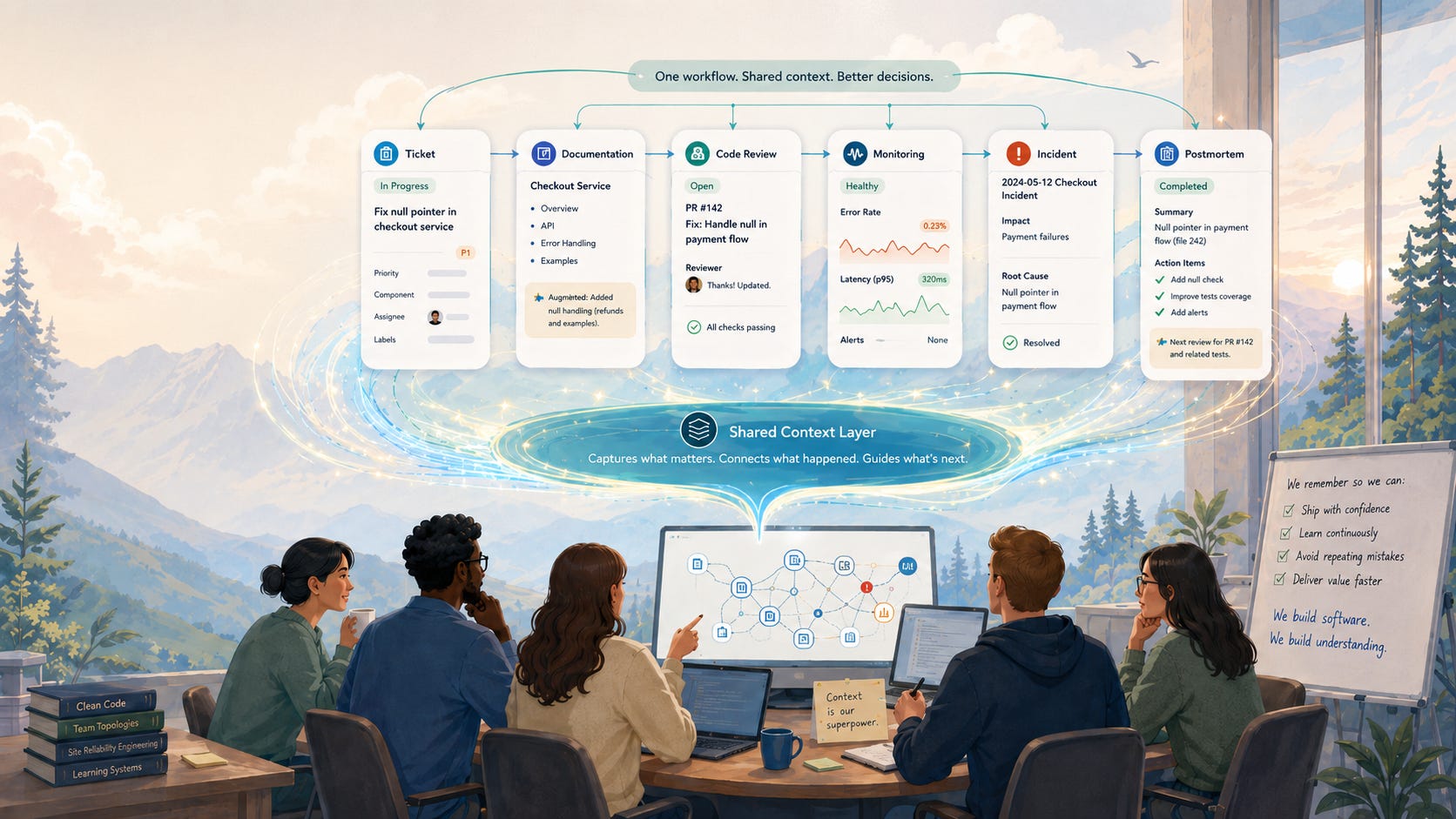
When an agent helps inside a shared Slack thread, the answer is not just an answer. It becomes part of the team’s record.
When an agent explains a pull request, that explanation can help the reviewer, the author, and the next person who touches the code.
When an agent helps investigate an incident, the steps they took can become part of the postmortem.
When an agent uses a runbook, the team can see whether the runbook was useful, incomplete, or outdated.
This is where AI starts to feel less like a personal productivity hack and more like team infrastructure. The value is not only in the output. It is in the work’s visibility.
Because once the work is visible, people can learn from it. They can correct it. They can reuse it. They can improve the instructions. They can notice where the agent misunderstood something and fix the underlying documentation.
That is why the agent’s location matters. An AI tool inside a private chat window can help you think. An AI agent inside the SDLC can help the team remember.
A new kind of SDLC agent is emerging.
One useful signal is CodeRabbit’s Agent for Slack. I do not think the interesting part is simply that CodeRabbit now has a Slack agent. Plenty of AI tools are adding agents, copilots, assistants, and integrations.
The more interesting part is the agent’s shape.
It is not designed as a private coding assistant that sits solely in the IDE.
It is designed to work inside Slack, where engineering teams already coordinate work, and to pull context from the systems around that work: code, tickets, docs, monitoring tools, cloud infrastructure and team conversations.
CodeRabbit describes this as an agent for the entire software development lifecycle, not just for code review or code generation.
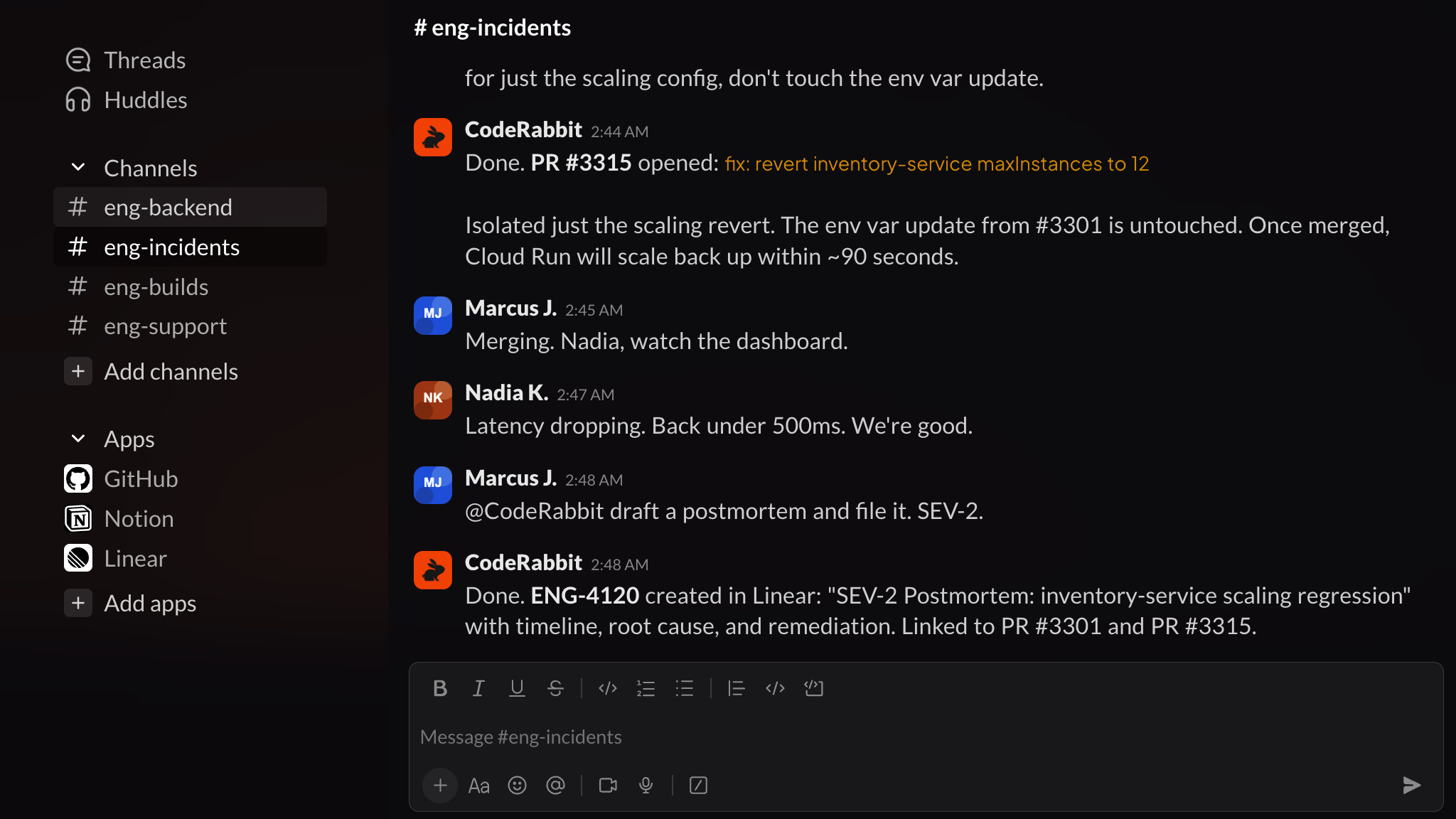
Source: CodeRabbit
That distinction matters. A normal AI coding tool usually helps with a narrow task. It can explain a function, write a test, suggest a fix, or summarize a diff. This kind of SDLC agent is trying to solve a different problem, the context problem. It tries to understand the work around the code, for example:
Which conversation started this task?
Which ticket is connected to it?
Which repo changed recently
Which runbook applies to this ? What did the monitoring system show?
What did the team decide last time?
What should be remembered for the next person?
That is why memory layer is becoming important.
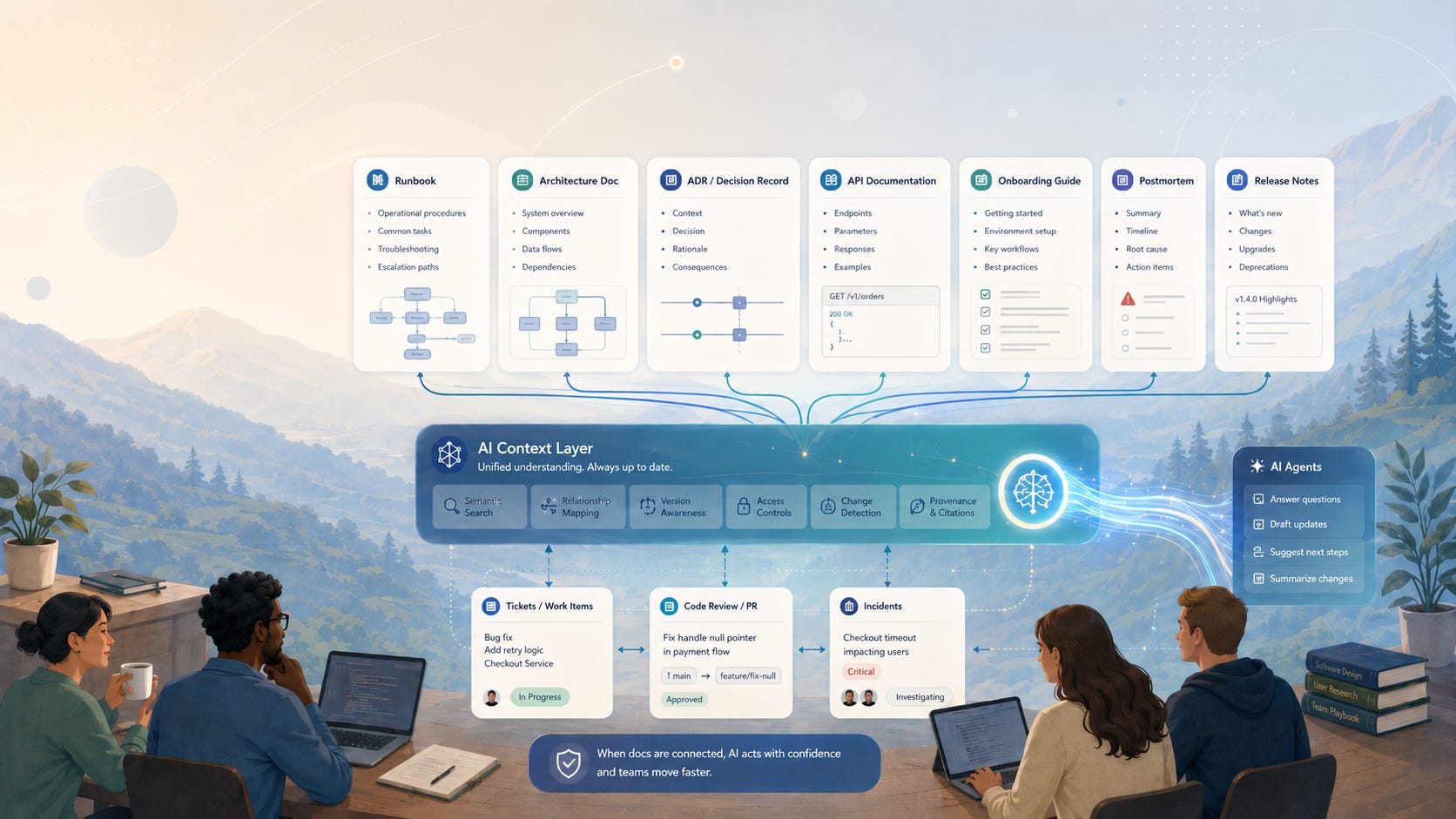
CodeRabbit describes the agent as building a living knowledge base from Slack and connected systems. The idea is that decisions, fixes, and patterns are captured as they happen, then refined through daily use. It also separates memory into different levels: team knowledge across teams and repos, channel memory for team-specific patterns and runbooks, and thread memory for the current task.
Most companies already have these memories. They are just not very well organised. A team has a memory of how deployments usually fail.
A channel has a memory of what the checkout team means when they say inventory is slow again. A thread has a memory of what was already tried, who added context, and why the current fix is being discussed.
Usually, humans have to manually carry that memory by scrolling through Slack, searching old PRs, or jumping between Datadog, GitHub, Linear, Notion, and cloud logs to reconstruct the story.
An SDLC agent is useful if it can reduce that reconstruction work. Not by replacing the engineer’s judgment, but by bringing the scattered context into the place where the team is already talking.
Why Shopify’s River example matters
Recently, Shopify CEO Tobi Lütke shared an interesting article on X about how Shopify is using AI internally.
The company built an AI agent called River that lives inside Shopify’s Slack.
River can read code, run tests, write code, open pull requests, query data, and inspect production traces but the most interesting part of the story is not the capability list.
It is the constraint that Shopify imposed on River’s operations.
River does not work in private DMs. It works in public Slack channels. That may sound like a small product decision but it changes the whole learning model.

When someone works with an AI assistant in a private chat window, the benefit mostly stays with that person. They may get unstuck faster. They may understand the bug better. They may learn a better way to write the query or structure the fix.
But the process disappears.
No one else sees how the problem was framed.
No one else sees which context mattered.
No one else sees where the agent misunderstood something.
No one else learns from the path taken.
Shopify’s River flips that model because the work happens in public channels, other people can watch, jump in, add context, correct the agent, and learn from the interaction.
A new engineer can see how a senior dev scopes a vague request. A support engineer can learn how someone finds the right prod trace. A team can identify where the agent got stuck and improve the instructions, docs, or runbooks related to it.
That is the part I find most important.
The agent is not just doing work. It is making the work visible.
Visible work becomes teachable work.
In the post, Lütke connects this to the idea of a Lehrwerkstatt, a German term he describes as a teaching workshop, a place where people learn by being close to the work itself. That is a useful way to think about AI inside the SDLC. The best agents may not only help individuals move faster. They may help teams learn from each other’s work as it happens.
If AI work happens privately, the company loses most of the learning. But if AI work happens in shared spaces, the conversations become searchable, the patterns become reusable, and the organization slowly builds memory around how work gets done.
That does not mean every AI interaction should be public. There will always be sensitive work, private work, and access boundaries but River points to an important design principle “> The more AI agents participate in real company workflows, the more important visibility becomes.”
Because the future of AI in the SDLC is not only about getting work done faster, it is about making the work easier for the whole company to understand, reuse, and improve.
The hard part is trust.
Once AI agents move into the SDLC, conversation changes. When an AI assistant is sitting in a private chat window, the risk is limited. It can give a bad answer. It can misunderstand a prompt. It can suggest code that does not work. Annoying, yes, but usually contained.
But an agent inside the SDLC is different.
Now the agent may be close to source code, tickets, incident channels, customer issues, monitoring tools, internal docs, runbooks, and cloud systems. It may not only answer questions. It may investigate, summarize, open pull requests, suggest fixes, update tickets, or trigger workflows.
At that point, the question is no longer only: Can the agent reason well?
The better question is whether the team trusts it within the systems where real work happens. That trust has many layers.
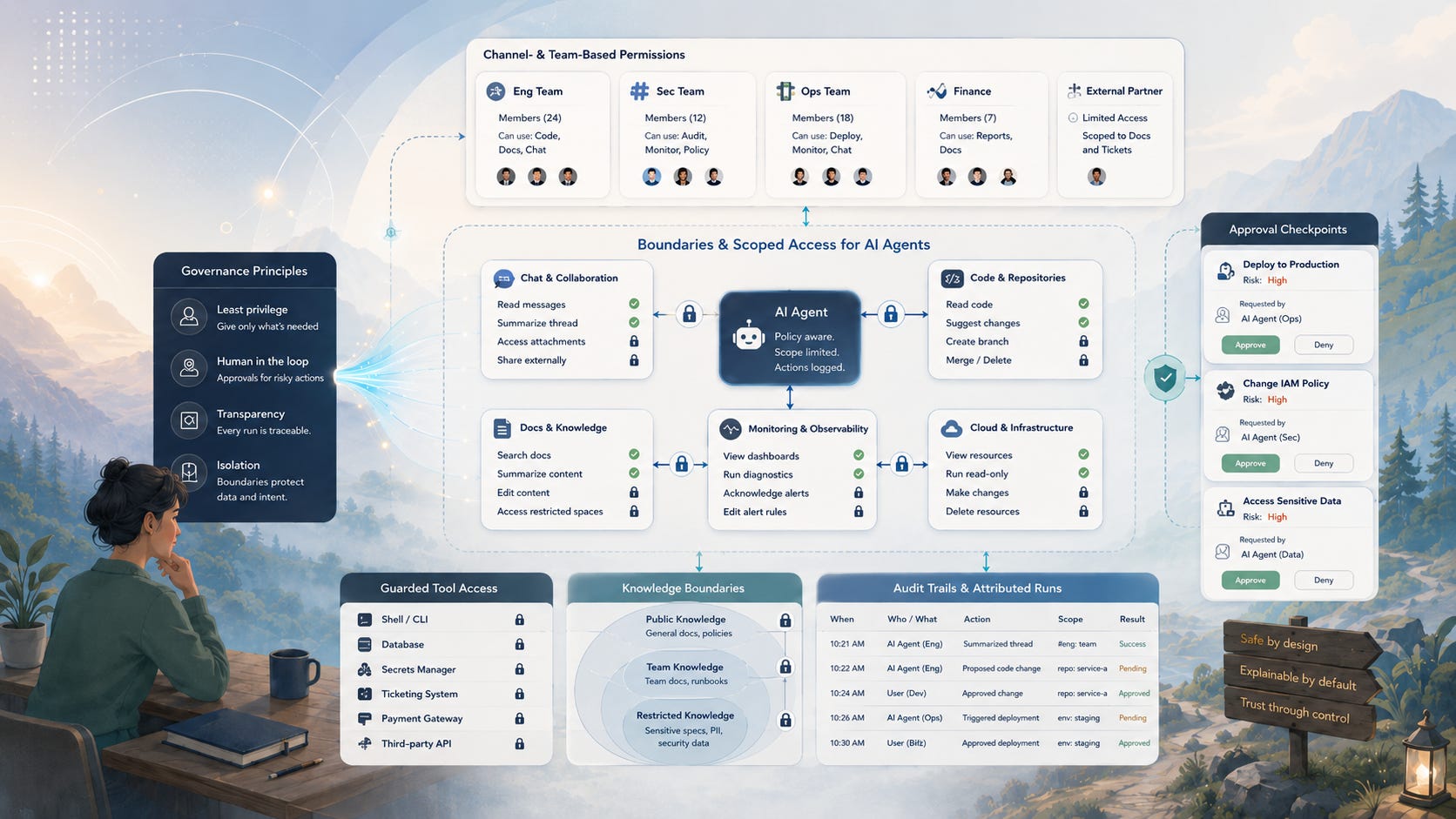
First layer is Access
What should you allow your agent to see? Should it read every Slack channel, or only the channels where it has been added? Should it access all repositories, or only the ones connected to a team? Should it see customer support data, incident notes, internal roadmaps, private discussions, or production logs?
These are not small details. A company-wide knowledge layer is only useful if it respects the company’s boundaries.
Second layer is Action
What should the agent be allowed to do?
Reading a runbook is one thing. Opening a pull request is another. Changing infrastructure is another level entirely. Posting an incident summary in Slack is useful. Triggering a deployment without approval is a very different risk.
So teams will need clear rules on what agents can suggest, draft, and execute, and where human approval is required.
Third layer is Memory
This may be the hardest one. If an agent is building memory from daily work, someone has to decide what to remember, what to forget, and what to correct.
A Slack thread may contain useful context, but it may also contain speculation from the first five minutes of an incident. A postmortem may contain a final root cause, but an earlier message may contain a wrong assumption. A runbook may be accurate today and dangerous six months from now.
If the agent remembers everything equally, the company does not get intelligence. It gets cluttered. So memory hygiene becomes part of the system. Teams will need ways to correct stale knowledge, mark trusted sources, scope knowledge by team or channel, and ensure agents do not treat every old conversation as the truth.
This is why I find the governance language around tools like CodeRabbit Agent interesting, even if the broader point extends beyond a single product. CodeRabbit provides guardrails for access, knowledge scope, tool control, and cost attribution, with runs tied to channels and users so teams can see what the agent did, for whom, and what it cost.
That is the right category of problem. Because an SDLC agent is not just another interface. It becomes part of the team’s operating environment.
And when something becomes part of the operating environment, trust cannot be vague. It has to be designed to answer questions such as:
Who asked the agent to act?
Which tools did it call?
What context did it rely on
What did it change, and who approved the change?
What did it cost?
Can the team replay or audit the work later?
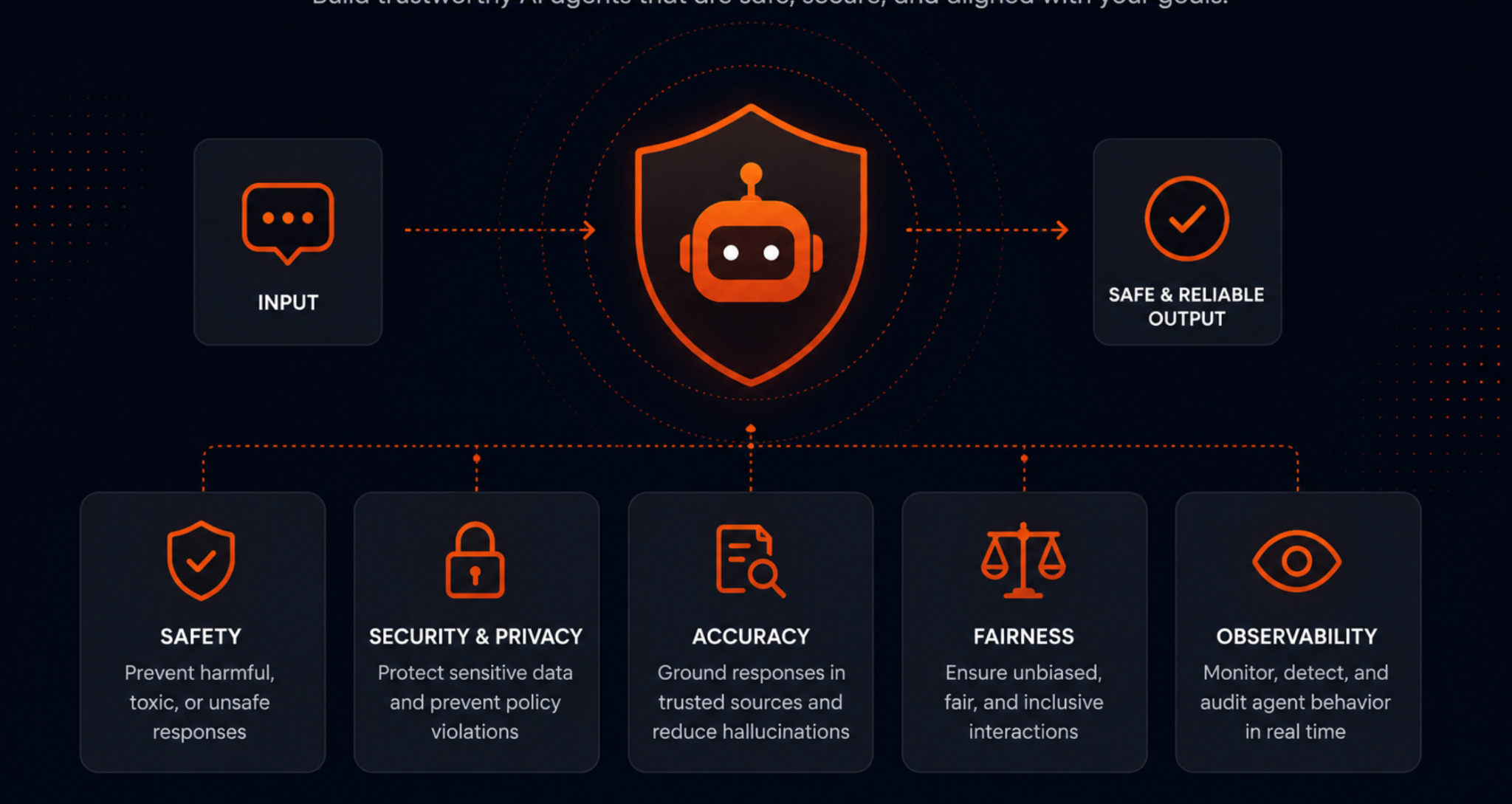
A clever agent that nobody trusts will remain a demo. On the other hand, a slightly less magical agent with clear permissions, visible reasoning, scoped memory, and human approval can become part of the workflow.
That is where the real adoption curve will be. Not just smarter models but also more trustworthy systems. The future of AI in the SDLC will depend less on whether agents can produce impressive answers in isolation and more on whether teams can safely let them work near the places where software is planned, built, shipped, and maintained.
SDLC agents as company memory systems
This is the bigger idea powering all this. The most useful SDLC agents will not just be tools that complete tasks. They will become systems that help the company remember how work gets done. That sounds simple, but it changes the role of AI inside engineering teams.
A private assistant helps one person think through a problem. An SDLC agent can help a team preserve the work’s path, including the original request, the discussion around it, the ticket, the code change, the review, the deployment, the incident, the fix, and the lesson that should carry forward. That is company memory. Not memory in the abstract sense. Real operational memory.
The kind that answers questions like:
Why did we build it this way?
What broke last time?
Who reviewed the risky part?
Which runbook applies here ? What did the customer actually report ?
Which fix worked before?
What should the next person know before touching this system?
Today, a lot of that memory is scattered.
Some of it is in the docs.
Some of it is in pull requests.
Some of it is in Slack.
Some of it is in incident notes.
Some of it is in tickets.
Some of it is in the heads of people who may not always be available.
An SDLC agent becomes valuable when it can help connect those pieces without forcing the team to manually reconstruct the story every time.
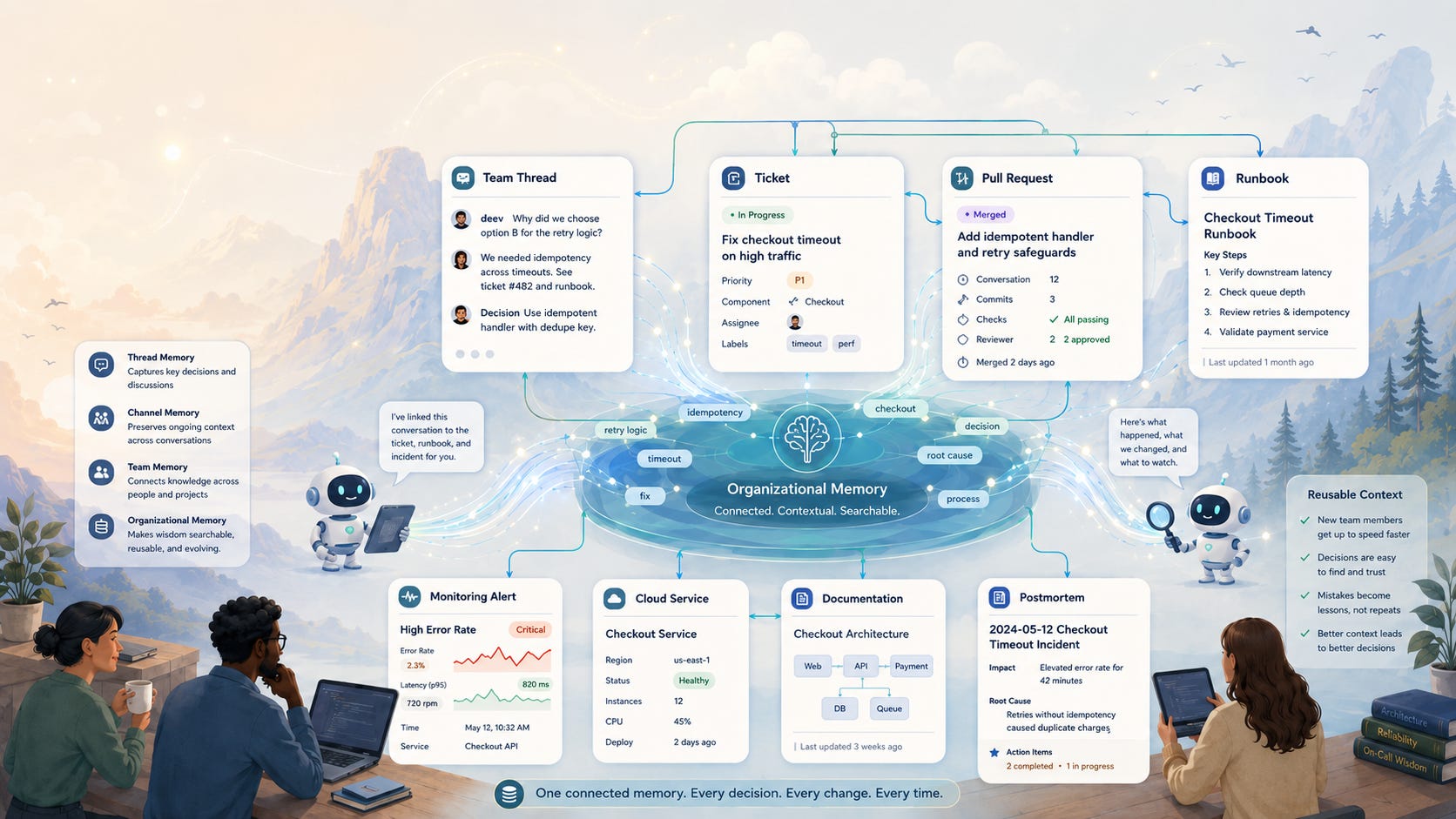
This is not about replacing engineers.
It is about reducing the amount of hidden context every engineer has to rediscover before doing good work. The best version of this future is not a company where agents silently do everything in the background. That would make teams more fragile.
The better version is a company that makes work more visible, searchable, and reusable.
They help people see the reasoning behind a decision.
They surface the past incident that looks similar.
They connect a new ticket to an old conversation.
They remind the team that a runbook exists.
They help turn a messy investigation into a useful postmortem.
They make the next person start with more context than the last person had.
That is how knowledge compounds. And that is why the SDLC is such an important place for AI to move into, because the SDLC is where technical memory is created every day.
Every ticket, every PR, every review, every incident, every release, every support escalation, and every postmortem adds another small piece to the company’s understanding of itself.
The opportunity is to stop treating those pieces as scattered artifacts and start treating them as a living memory layer. That is the real promise of SDLC agents, not just faster coding but also faster understanding, better continuity, less repeated work, fewer lost decisions, and more shared learning.
A company that remembers well can move faster without becoming careless. AI is not only helping software teams get more work done. It is also helping them preserve more of what the work teaches them.
Conclusion
AI is leaving the chat window but destination is not limited to the IDE.
The more interesting destination is the workflow around the IDE.
Slack threads where the requirement is clarified.
Ticket where the work begins.
Pull request in which judgment is passed.
Monitoring alert where production tells the truth.
Runbook that explains what to do next.
Postmortem is meant to ensure the team remembers.
That is where software teams actually learn and that is why this shift matters.
If AI agents only help individuals write code faster, they will still be useful. But the bigger opportunity is for them to help teams preserve context, surface past decisions, connect scattered systems, and make daily engineering work easier to learn from.
The best agents may not be the ones that quietly disappear into the background and do everything for us. They may be the ones who work where the team can see them.
Where people can correct them.
Where context can be added.
Where decisions can be traced.
Where patterns can be reused.
Where the next person starts with more understanding than the last person had.
That feels like a better version of AI in software development, where agents support engineers rather than replacing them or reducing software work to just writing prompts.
A kind of AI that helps teams become better at remembering how they build, debug, review, ship, and maintain software. The SDLC has always been a knowledge system. AI agents are simply making that harder to ignore.
That’s a wrap for this edition.
What’s your take? I’d love to hear your thoughts.
Thanks so much for taking a few minutes to read.
If you liked the post, consider sharing with a friend or community that may enjoy it too.
Excellent article as always, keep these coming Ankur!