

How Neon Handles Database Branching: The Engineering Behind Instant Postgres Forks
You can fork a terabyte of Postgres in about a second. The surprising part is that nothing gets copied at all.


Hey everyone!
I’m back in your inbox and this time I want to talk about how Neon handles database branching but before that I want to introduce Rishi Raj Jain as a guest author.
He’s a software engineer and a technical writer focused on building real-world web applications and helping developers navigate unfamiliar technology stacks. He’s been the founding Solutions Engineer at Neon (acquired by Databricks), and previously worked on developer experience at Edgio (acquired by Limelight Networks).
Find him on:
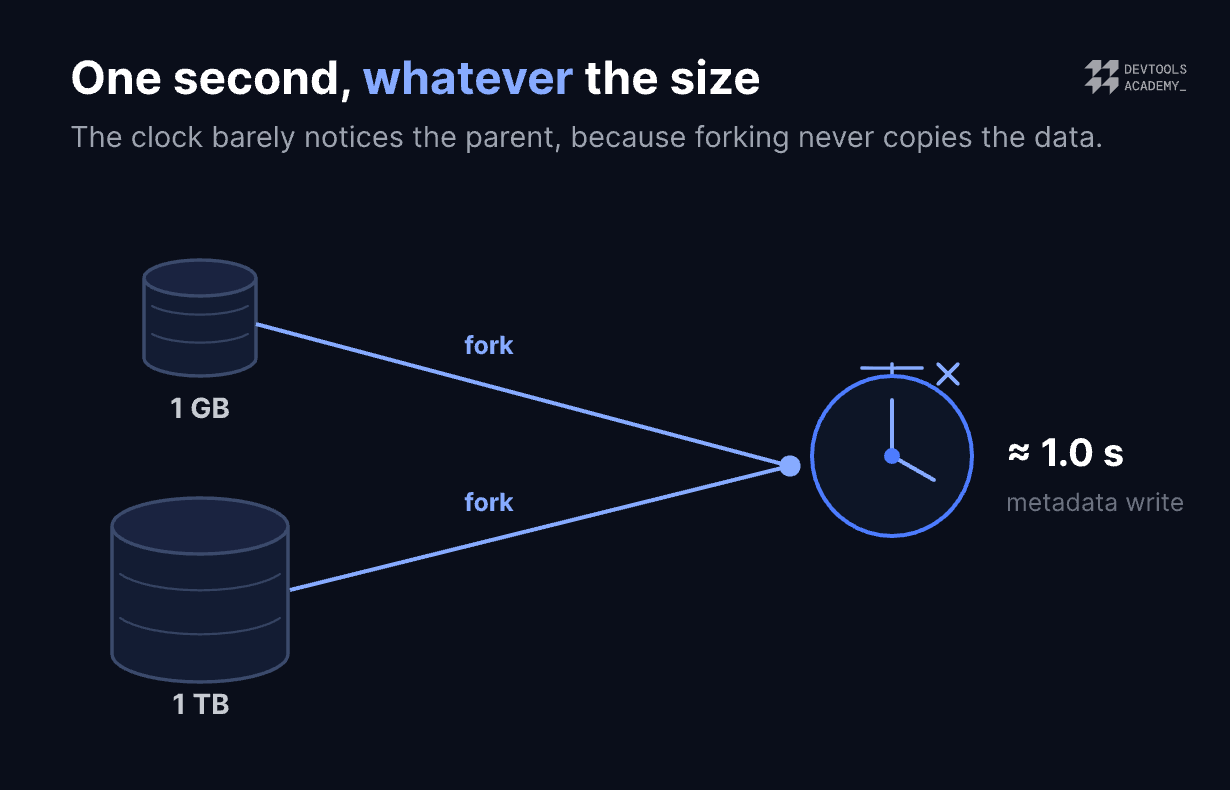
Let’s start with something you can try. Take a Postgres database with real production data in it, big enough that you would not want to download a copy to your laptop, say 500 GB. Ask Neon to branch it, and watch the terminal. The command finishes almost right away, and you have a second, full copy of the database to work with.
That is a little strange when you think about it. Copying 500 GB takes real time, and the more data there is, the longer a copy takes. So if the branch was ready in about a second, then a full copy is not what happened.
In today’s post, I will cover what happened, and why the size of the database barely changed how long it took. Neon calls this branching as the new standard for relational databases. We are going to follow one branch from the command you run to the first query you get back, and keep asking one question along the way: what has to happen for this to be fast, and what does not happen at all.
Before we get into it, try it first: Neon has a small demo where you copy a database, edit the copy, and restore it, all in a moment no matter the size. Click through it and time the branch yourself. ▶ Live branching demo
Review the actual change, not the file list.
AI writes more code than ever. Reviewing it shouldn’t mean scrolling forty files in alphabetical order.
CodeRabbit Review reorganizes any pull request from a flat file list into a structured, layer-by-layer walkthrough - the logical reading order of the change, not the order your platform happens to sort it. Every range gets its own plain-language summary, with sequence diagrams, state machines, and ERDs generated inline wherever a visual earns its place.
Cohorts group related files and chunks so you review one idea at a time. Layers order them so foundational changes - data shapes, contracts - come before the code that depends on them. Code Peek lets you click any variable, function, class or type to see its definition and usages without leaving the tab, while Semantic Diff view cuts past formatting noise to show what actually changed.
Open it straight from the Review Change Stack button in the PR Walkthrough. Navigate cohorts and layers from the keyboard, comment against exact line ranges and submit native reviews, comments and approvals post back to GitHub or GitLab right where your team expects them.
In the early access, available for free to everyone.
From the team that pioneered AI code reviews. 2M reviews every week. 6M repos. 15K customers.The review interface built for the way modern PRs are actually written.
(Thanks, CodeRabbit team for partnering on this post.)
Now let’s take it apart.
Append-only storage: why Neon never overwrites a page
Before we can talk about why a branch is fast, we have to talk about how Neon stores data, because the speed comes straight from it.
First, one word we will use a lot. Postgres keeps its data in fixed-size blocks called pages. A page is a small chunk of the database, and every read or write ultimately moves pages around.
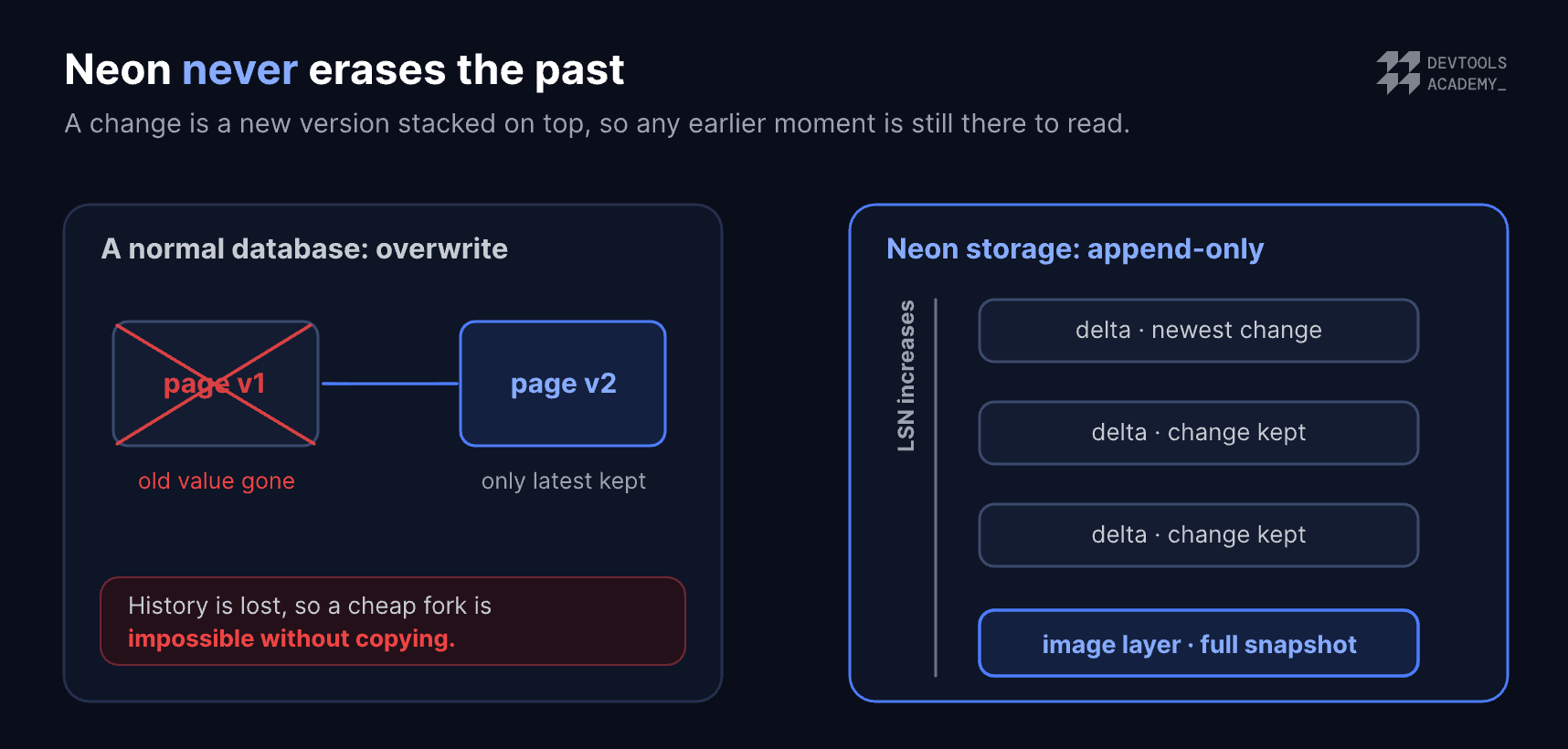
Most databases change a page in place. When a value changes, the new value is written over the old one, and the old one is gone. Neon does not do this. When a value changes, Neon writes a new version of the page and keeps the old version too. Nothing is overwritten in place. Neon calls its storage bottomless and branchable, and the branchable part comes straight from the fact that it keeps everything.
There is a good chance you have relied on a version of this idea already. Inside a single Postgres server, a long-running query can keep reading a consistent view of the data even while other transactions change the same rows underneath it, because Postgres holds on to the older row versions until nothing needs them anymore. Neon applies that same approach to its whole storage layer. Since no past state is ever thrown away, the database as it looked at any earlier moment is still on disk and ready to be read, and a branch points back to one of those moments.
Now, let’s find how you point at one of those past moments.
Log Sequence Numbers: addressing any moment in history
If Neon keeps every version of every page, it needs a way to point at one exact moment. That is what an LSN is.
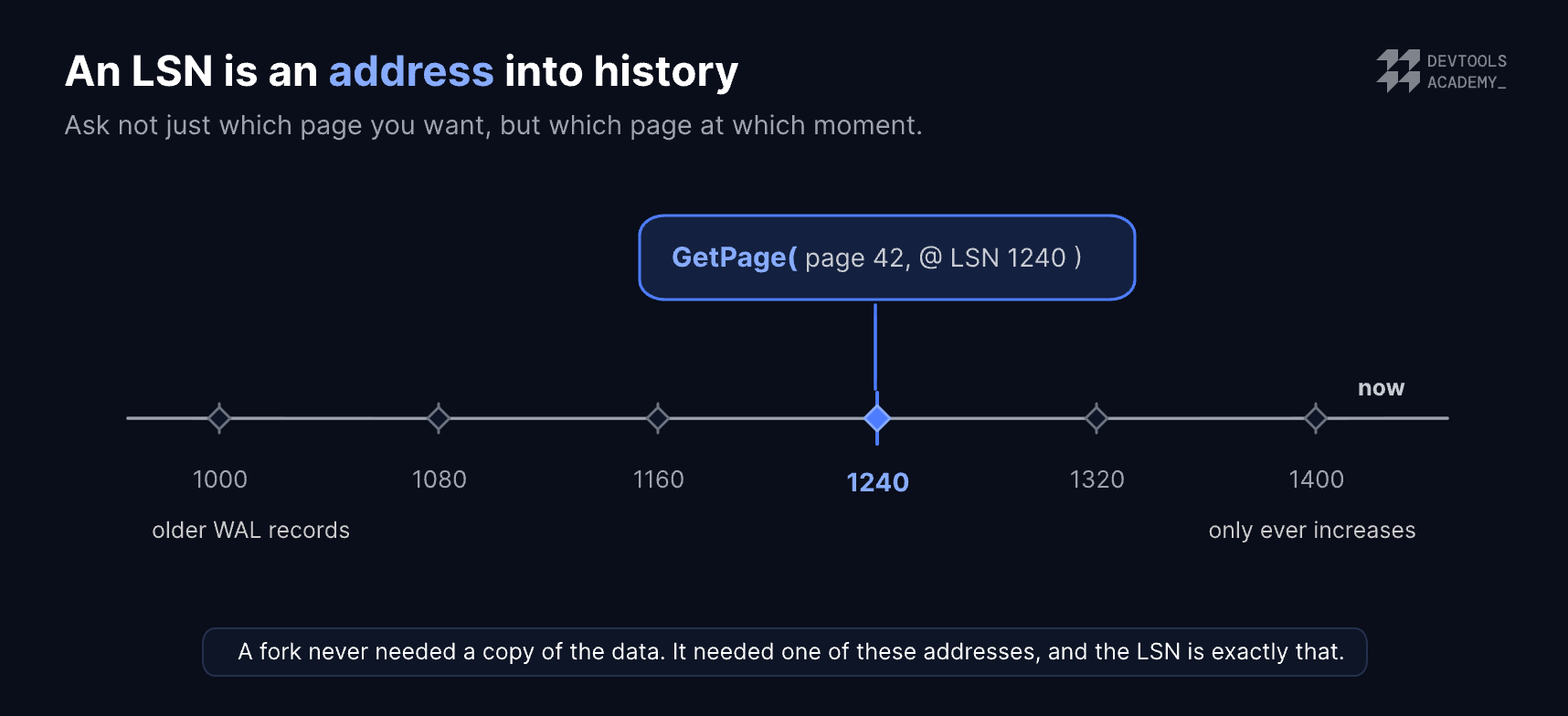
LSN stands for Log Sequence Number, a value that only ever increases. Postgres already records every change it makes in an ordered list called the write-ahead log, and Neon labels each entry with an LSN, so it works like a bookmark for one exact point in the database’s history. If you have ever set up streaming replication or point-in-time recovery, you have already met LSNs, since they are how a replica tracks exactly how far it has caught up with the primary.
Once you have that bookmark, you can ask a more useful question. Instead of only asking “give me this page”, you can ask “give me this page as it was at this LSN”. Neon calls this GetPage at LSN, and it is how Neon can hand you any page from any moment in the past.
So a branch never needed a copy of the data. It needed a way to point at a moment, and the LSN is that pointer.
Now, let’s watch what Neon actually does when you ask for a branch.
Creating a branch: a few hundred bytes of metadata
Let’s go through the creation step slowly.
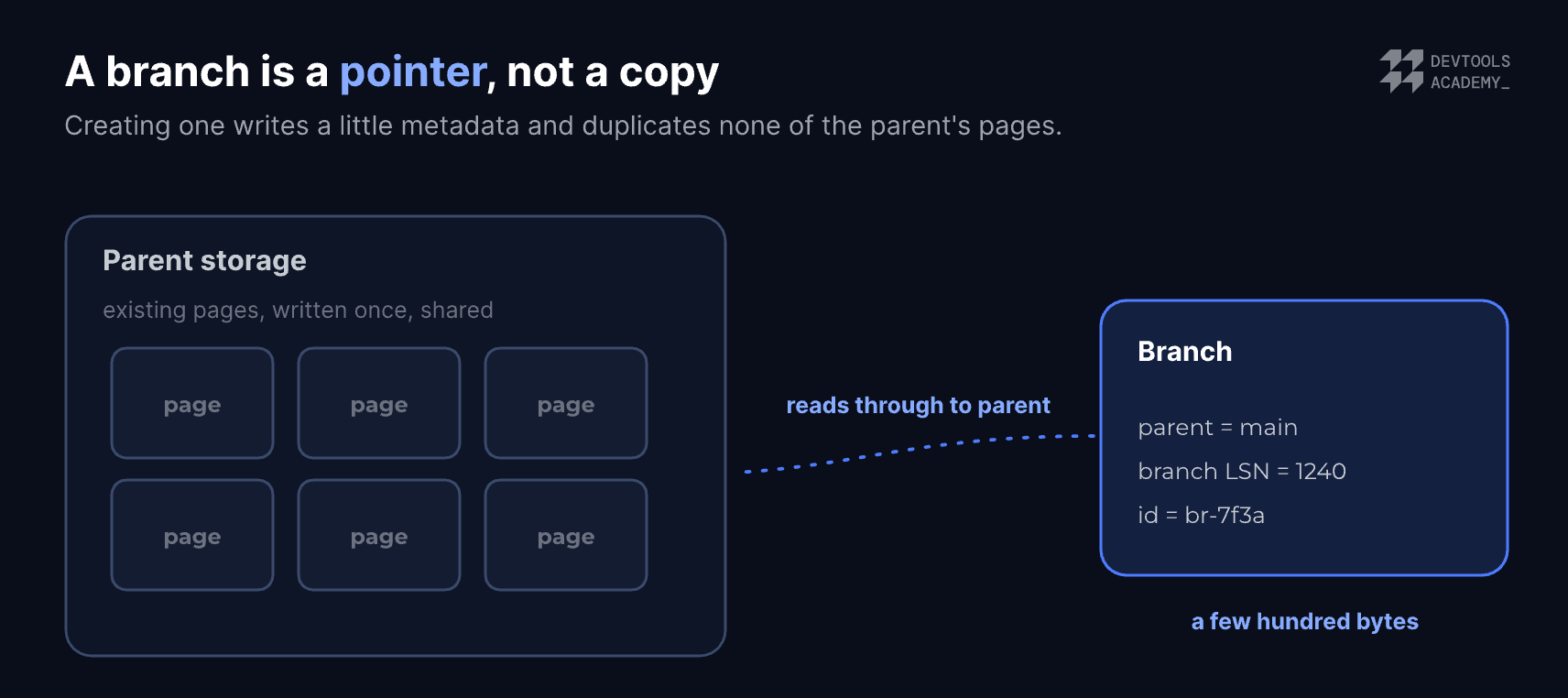
You tell Neon to branch from the parent at a chosen LSN. In response, Neon writes a small note: which database it branched from, the LSN it branched at, and a new name for the branch. That write is only a few hundred bytes.
None of the parent’s data is copied. Not one page. The branch starts out holding almost nothing of its own. That is why the size of the parent does not matter. The work is the same small note whether the parent is 1 GB or 1 TB, so both branches finish in about the same time. Neon showed this by branching a full terabyte in seconds in instantly copy TB-size datasets. Once you know the copy never happens, the constant speed follows directly.
Now, let’s see how a branch that copied nothing can still answer a query.
The first read: rebuilding a page from shared history
If the branch holds almost no data, how does it answer a query?
Say you run your first query on the branch, and it asks for a page you have not changed. The branch has no copy of that page, so it looks back into the parent’s history. It finds two kinds of files there. An image layer is a full snapshot of the page from some earlier moment. Delta layers hold the changes made since that snapshot. Neon takes the snapshot, applies the changes on top, and gives you the finished page. This is the same storage engine the parent itself uses.
So the branch feels like a complete database, because it can see everything the parent had at the branch LSN. It does not own any of that data yet. It is reading from the shared history.
Now, let’s follow what happens the first time you change something.
The first write: copy-on-write in action
Reads come from the parent. Writes are where the branch starts to become its own thing.
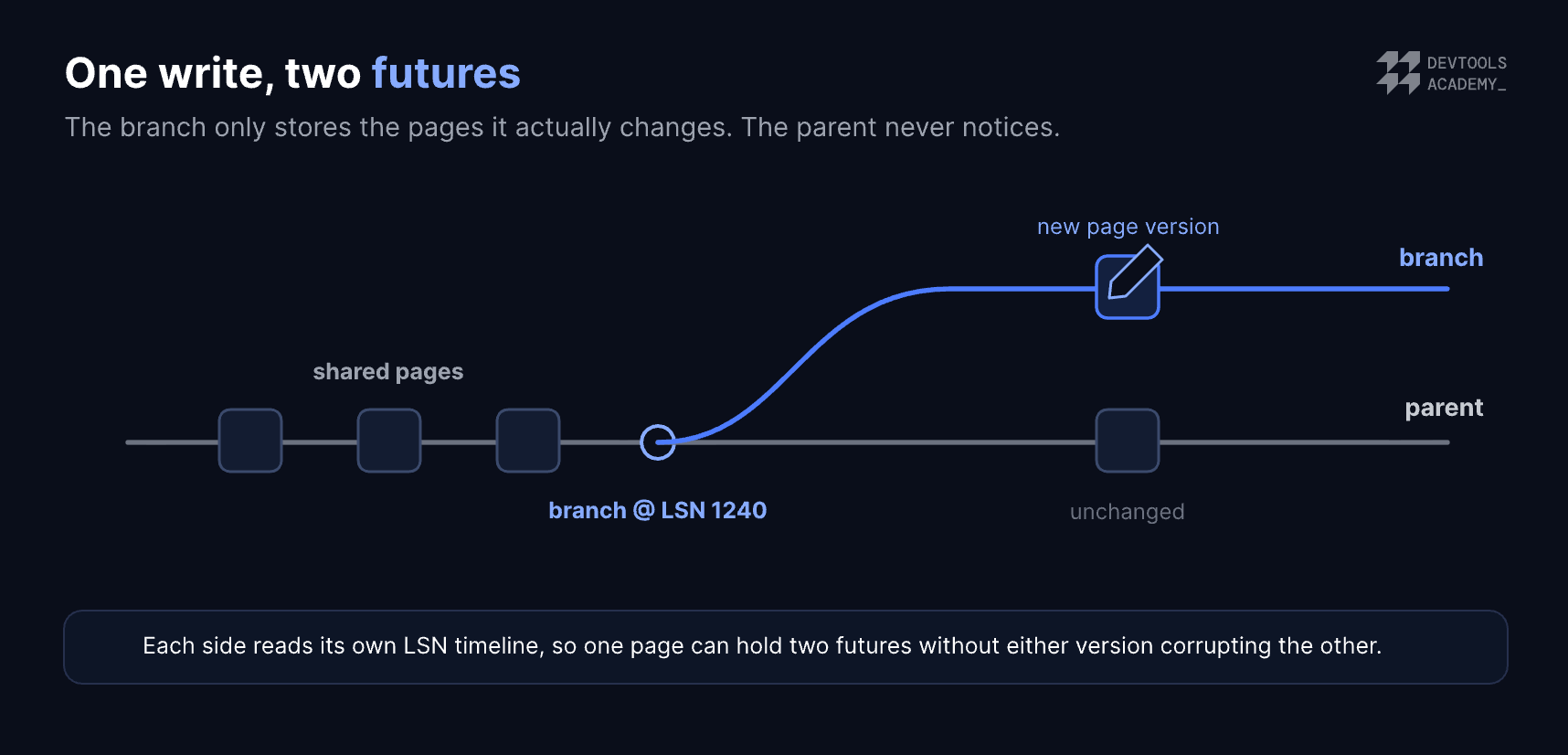
Say you change a single row on the branch. Neon writes a new version of that page into the branch’s own layers, marked at a point after the branch started. The parent’s copy of that page is left alone. If you have taken snapshots with ZFS or LVM, this will feel familiar, because it is the same copy-on-write idea: the branch keeps sharing the parent’s blocks and writes something new only when a page actually changes.
The parent and the branch do not step on each other, because each one reads along its own line of LSNs. The same page can have two different futures, one on the parent and one on the branch, and neither one changes the other.
A branch stores only the pages you actually change, so it starts near zero and grows in step with your edits. The size of the parent never enters into it.
Now, let’s look at the catch that makes all of this actually work.
Retention: keeping history alive so branches keep working
This is the part I most want you to see.
A branch only works as long as the parent’s old page versions still exist at the branch LSN. Remember, the branch does not own those pages. It reads through to them. So if Neon ever deleted the history a branch depends on, that branch would break.
This means Neon cannot reclaim old data carelessly. Postgres already deals with a version of this problem: its autovacuum process frees space from dead row versions, but only once no transaction still needs them. Neon’s storage faces the same question one level up, since it can only remove an old layer after no live branch still points back to it. It has to hold on to exactly the history that live branches depend on.
The same design gives you fast recovery. Since the past is still on disk, recovering from a bad change means reading from an earlier LSN. Neon has a demo for this that makes it clear.
See a recovery happen: This one takes down a running app the way a bad migration or a wrong delete would in production, then brings it back in moments by reading from an earlier point in time. It is the same never-overwrite storage from before, seen from the recovery side. ▶ Live outage and recovery demo
Now, let’s meet the other half of the system, the part that runs your queries.
Separating compute from storage
We have followed the storage side. There is one more part, because a branch still needs something running that can answer queries.
When you connect to a branch, Neon starts a compute node and points it at that branch. It reads pages from the shared storage as it needs them, the same kind of reads we followed earlier. What it does not do is download a local copy of the data before it will talk to you.
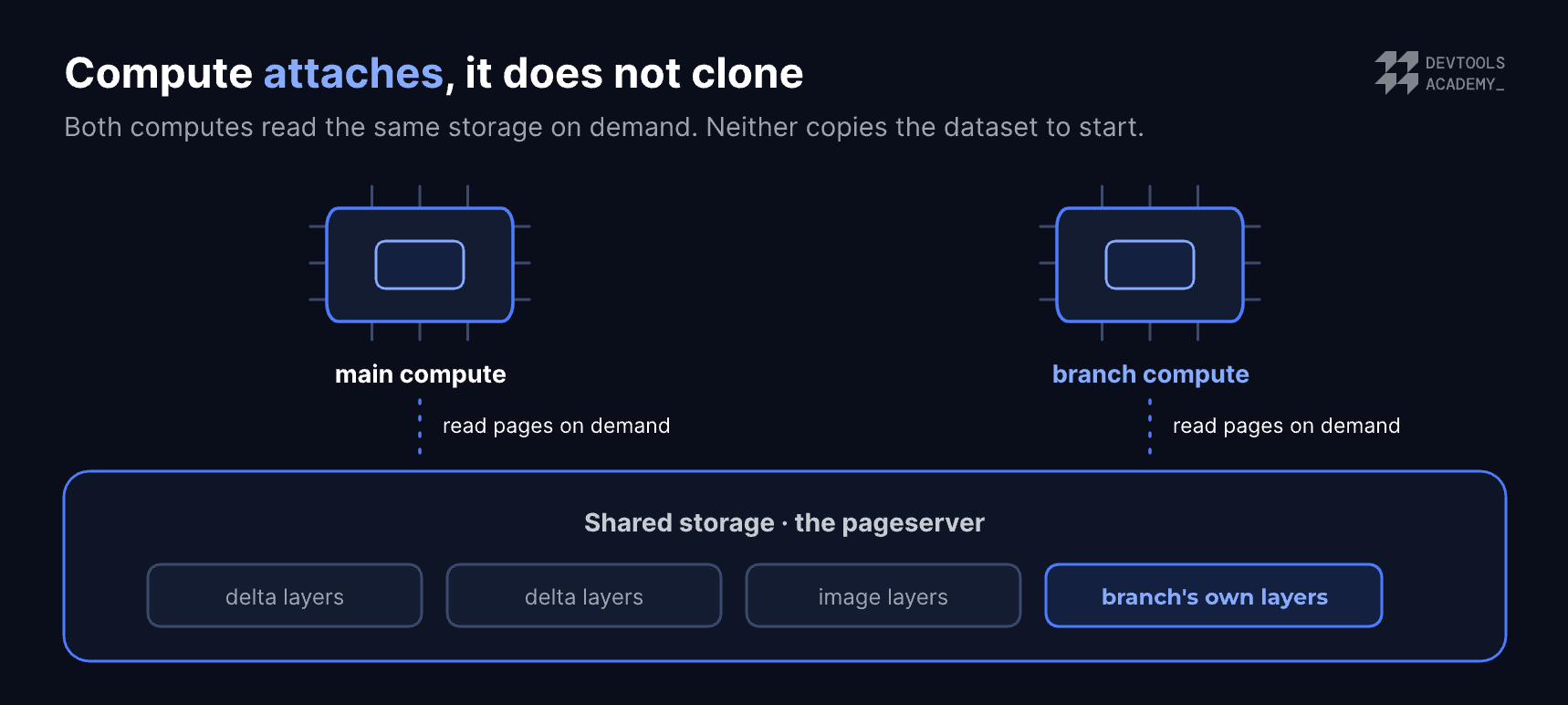
This is what keeps a branch fast from start to finish. Neither the storage nor the compute ever moves the data before you can connect. Nothing copies, so nothing waits.
Now, let’s put every piece together into one run.
An instant branch, end to end
With each part explained, here is the full branch as one sequence:
You run the branch command, and Neon writes a small note: the parent, the branch LSN, and a new name.
None of the parent’s data is copied, so the parent’s size does not change the time.
A compute node connects to the branch and reads from shared storage as needed.
The first read rebuilds a page from the parent’s shared snapshot and changes, so the branch looks complete while owning almost nothing.
The first write goes into the branch’s own layers after the branch LSN, and the two lines of history go their own way without touching each other.
The speed comes from a single design decision. Neon arranged its storage so that branching never has to copy data in the first place.
Now, you must wonder what this approach costs.
The tradeoffs behind instant branching
All that retained history lives on disk, and disk costs money, so retention windows and cleanup are there to keep it in check. A branch also leans on the parent’s history staying intact behind it, since that is what it reads through to. The work of branching did not vanish but rather shifted from copying data up front to holding on to history over time, which is far cheaper to store and manage.
Underneath, it comes down to three choices: keep compute and storage separate, never overwrite the past, and use an LSN to point at any moment in that past. With those three in place, fast branching falls out of the design on its own.
The best way to believe any of this is to try it. Branch a database, change one row, and look at how little storage actually moved.
If you want to go further, the practical guide to database branching and the get started with branching guide are good next stops.
That’s a wrap for this edition.
Thanks so much for taking a few minutes to read.
If you liked the post, consider sharing with a friend or community that may enjoy it too.